Showing posts with label Xcode. Show all posts

Sunday, January 1, 2012

iOS SDK Development - new Book

I was taking a class on how to communicate between iOS app and a Ruby on Rails server using JSON when a new book was released (beta) by Pragmatic Programmer.  The book, iOS SDK Development by Chris Adamson and Bill Dudney is spot on for me right now.

I had been taking a cram class from Mattt Thompson that covered this topic but was still emphasized manual memory management and non-storyboard techniques.  Both valuable things to know but Adamson and Dudney's book used ARC and Storyboards and even covers JSON using the new support in iOS 5.   I have to really hustle to keep up with Mattt covering a lot of material in just 3 Saturday sessions of 6 hours each.  That has given me a good base to move ahead.  iOS SDK Development is exactly what I need to fill in some of the blanks and to make the full transition to iOS 5 features.


Thursday, November 10, 2011

iOS 5 Programming

Well, I got Hillegass and Conway's book, iOS Programming 2nd Edition for my birthday in late September.  I was having fun learning how to write applications for the iPhone and iPad. That is, I was having fun until my iPhone 4S showed up and I installed an upgrade to Xcode.

Oops.

The book was published July 2, 2011 and now, just three months later, the coding was broke.  Not totally, but enough that the authors suggested people roll back to Xcode 4.1.  Must be painful to have spent time writing a book and then have the coding environment change just three months later.

I tried lots of different ways of continuing but it was just too painful.  I thought about switching back to Xcode 4.1 and just using my old iPhone 3G (yeah, the 4S was a huge improvement) as a testbed.  But I read more info about iOS 5 and the changes and thought why put myself through learning iOS 4 then learning changes for 5.

I decided to forge ahead and learn iOS 5 from online tutorials but also use the book as a learning guide and update all the applications in it to iOS 5. So that is what I am going to do and will be blogging from time to time as I go.

Friday, November 4, 2011

Xcode 4.2 and company name

Well, I got another surprise with Xcode yesterday.  I had upgraded Xcode 4.2 to build 4D199 a few weeks ago.  I was still working on a project.  Everything seemed to be working fine, but I knew I would have some issues when I started a new iOS project because the new version included support for iOS 5.

But I got an extra surprise when the company name changed.  I had used the old standby way of setting the default company name with the command line:

defaults write com.apple.XcodePBXCustomTemplateMacroDefinitions'{ "ORGANIZATIONNAME" = "YourCompanyName" ; }'

but suddenly I was getting a different company name.

After digging around I found it was getting the name from the Address Book. What I had to do was change My Card to one that had my company name on it.  I had not updated the card for about two years so it seemed to me to be a new change in Xcode.


Monday, October 3, 2011

Xcode and git

If you are going to build enterprise applications you really need to use a good SCM.  I intend to look at how to integrate iOS apps within a larger application.  I have used SCM systems for more than 25 years and my current favorite is git.  I was using Hg before on a Java EE project but git has more and better tool support, IMHO.  I also love GitHub.

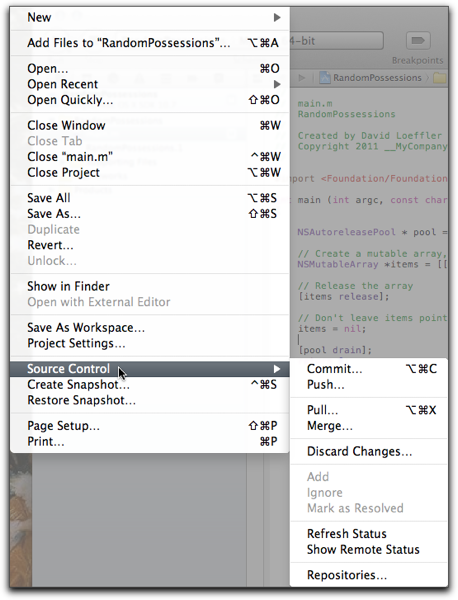
By default git will be used for any new Xcode project you create.  You have to uncheck the option during project creation if you don't want it. If you leave it checked Xcode will be create the default files for the project and it will do the initial commit.  After that you control the commits.  In this example I have added some code to the example in chapter 2 of Conway and Hillgras's book, iOS Programming, The Big Nerd Ranch Guide, 2nd  One way to access the git commands is via the File menu.

Xcode scm menu

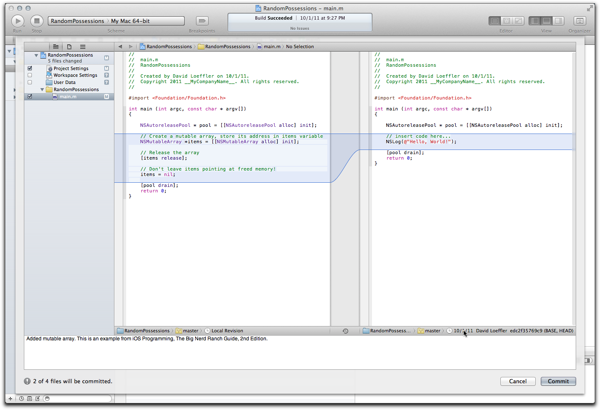
Since I just added some code I want to do a simple commit. This brings up window shown below.  You can not complete the commit until you have added a comment.

XCode git commit screen

Note you can see the diffs of any file being committed.  Not a bad interface for commits.  I'll be commenting on other features of git integration as I use them.

You can also view the SCM repositories and see change history from the same File>Source Control menu.

List of Xcode Repositories